> For the complete documentation index, see [llms.txt](https://docs.groundcover.com/llms.txt). Markdown versions of documentation pages are available by appending `.md` to page URLs; this page is available as [Markdown](https://docs.groundcover.com/automate/groundcover-mcp/getting-started-prompts.md).
# Getting-started Prompts
Once your MCP server is connected, you can dive right in.
Here are a few prompts to try. They work out of the box with agents like Cursor, Claude, or VS Code:
> 💡 Starting your request with “**Use groundcover**” is a helpful nudge - it pushes the agent toward MCP tools and context.
## Basic Prompts to Try
MCP supports complex, multi-step flows, but starting simple is the best way to ramp up.
### Pull Logs
**Prompt:**
{% code overflow="wrap" %}
```
Use groundcover to get 5 logs from the workload news-service from the past 15 minutes.
```
{% endcode %}
**Expected behavior:**\
The agent should call `query_logs` and show recent logs for that workload.
### Inspect a K8s Resource
**Prompt:**
{% code overflow="wrap" %}
```
Use groundcover to show the current state of the chat-app deployment.
```
{% endcode %}
**Expected behavior:**\
The agent should call `query_entities` with `kind:Deployment name:chat-app | limit 1` and return the deployment's live-state fields (replicas, status, labels, etc.) or a summary of them.
### Find Slow Workloads
**Prompt:**
{% code overflow="wrap" %}
```
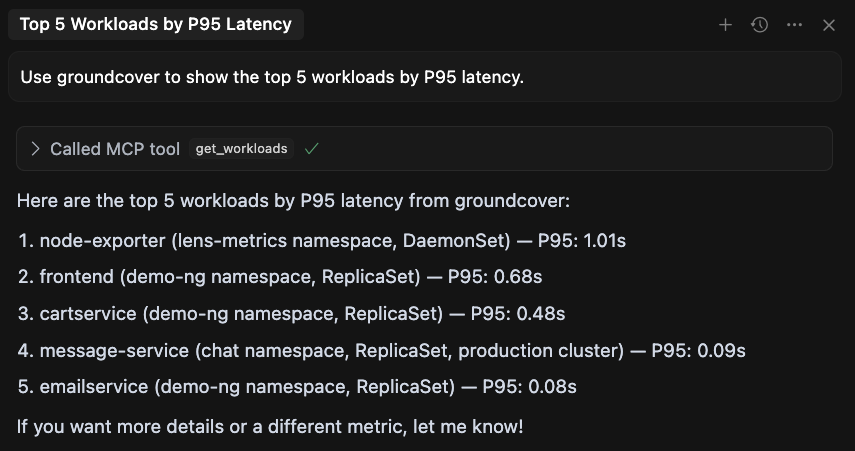
Use groundcover to show the top 5 workloads by P95 latency.
```
{% endcode %}
**Expected behavior:**\
The agent should call `query_traces` with a query like `* | stats by (workload) quantile(0.95, duration_seconds) as p95 | sort by (p95 desc) | limit 5` and return the top 5 workloads.
## Investigate Issues
When something breaks, your agent can help investigate and make sense of it.
### Paste an Issue Link
**Prompt:**
{% code overflow="wrap" %}
```
I got an alert for this critical groundcover issue. Can you investigate it?
https://app.groundcover.com/monitors/issues?...
```
{% endcode %}
**Expected behavior:**\
The agent should use `query_issues`, pull issue details, and kick off a relevant investigation using logs, traces, and metadata.
### Investigate Multiple Issues
**Prompt:**
{% code overflow="wrap" %}
```
I got multiple alerts in the staging-env namespace. Can you help me look into them using groundcover?
```
{% endcode %}
**Expected behavior:**\
The agent should call `query_issues` with a scoped query like `* | filter namespace:staging-env | sort by (_time desc) | limit 20` and walk through the returned issues one by one.
### Run an Async RCA
**Prompt:**
{% code overflow="wrap" %}
```
Use groundcover to investigate why checkout errors spiked in production around 10:30 UTC.
```
{% endcode %}
**Expected behavior:**\
The agent may start `async_investigate_rca`, then poll `get_async_job` until the RCA report is ready. It should verify important conclusions with direct query tools before presenting them as confirmed facts.
### Analyze Logs
**Prompt:**
{% code overflow="wrap" %}
```
Use groundcover to analyze error logs for the payments namespace in the last 30 minutes.
```
{% endcode %}
**Expected behavior:**\
The agent may start `async_analyze_logs`, poll `get_async_job`, and return a Markdown analysis of recurring log patterns, examples, and follow-up queries.
### Generate a Dashboard
**Prompt:**
{% code overflow="wrap" %}
```
Use groundcover to draft a dashboard for checkout service health: request rate, error rate, p95 latency, and pod restarts.
```
{% endcode %}
**Expected behavior:**\
The agent may start `async_generate_dashboard`, poll `get_async_job`, and return a dashboard JSON with `name`, optional `description`, and `preset`. The tool does not save the dashboard in groundcover.
## Automate Coding & Debugging
groundcover’s MCP can also be your coding sidekick.\
Instead of digging through tests and logs manually, deploy your changes and let the agent take over.
### Iterate Over Test Results
**Prompt:**
{% code overflow="wrap" %}
```
Use groundcover to debug this code. For each test, print relevant logs with test_id, and dive into any error logs.
```
{% endcode %}
**Expected behavior:**\
The agent should update the code with log statements, deploy it, and use `query_logs` to trace and debug.
### Deploy & Verify
**Prompt:**
{% code overflow="wrap" %}
```
Please deploy this service and verify everything works using groundcover.
```
{% endcode %}
**Expected behavior:**\
The agent should assist with deployment, then check for issues, error logs, and traces via groundcover.
---
# Agent Instructions
This documentation is published with GitBook. GitBook is the documentation platform designed so that both humans and AI agents can read, navigate, and reason over technical content effectively. Learn more at gitbook.com.
## Querying This Documentation
If you need additional information that is not directly available in this page, you can query the documentation by asking a question.
Perform an HTTP GET request on the following URL with the `ask` and `goal` query parameters:
```
GET https://docs.groundcover.com/automate/groundcover-mcp/getting-started-prompts.md?ask=&goal=
```
`ask` is the immediate question: it should be specific, self-contained, and written in natural language.
`goal` is what the user is ultimately trying to achieve, the reason they need the answer. Sharing it helps GitBook give you a better, more relevant answer. A goal is most helpful when it describes the outcome the user wants rather than restating the question. For example, with `ask=how do I create an API token`, a goal like `automate deployments from our CI pipeline` lets GitBook tailor the answer to that use case.
The response will contain a direct answer to the question and relevant excerpts and sources from the documentation.
Use this mechanism when the answer is not explicitly present in the current page, you need clarification or additional context, or you want to retrieve related documentation sections.