> For the complete documentation index, see [llms.txt](https://docs.groundcover.com/llms.txt). Markdown versions of documentation pages are available by appending `.md` to page URLs; this page is available as [Markdown](https://docs.groundcover.com/collect-data/data-pipelines/traces-pipeline.md).

# Traces Pipeline

## Overview

Traces pipeline is powered by [OpenTelemetry Transformation Language (OTTL)](https://github.com/open-telemetry/opentelemetry-collector-contrib/tree/main/pkg/ottl), a powerful and flexible language designed for transforming telemetry data. OTTL provides a rich set of functions and operators that allow you to filter, enrich, and transform your traces with precision.

Here are some common use cases:

* **Transform attributes** - Rename or reshape span attributes so they match your naming or schema.
* **Filter traces** - Drop spans you don’t need (e.g. health checks) to reduce storage and noise.
* **Enrich data** - Parse or derive new attributes from existing fields for better filtering in the UI.
* **Obfuscation** - Remove sensitive information from traces.

### Where the pipeline runs

The rules run in groundcover's sensors. The sensors in each cluster pull the pipeline from the Fleet Manager and apply it before sending spans, so dropped spans never leave your cluster. Spans sent directly to the groundcover-managed OTLP endpoint get the same rules at ingestion.

There is a single traces pipeline per backend, shared by all clusters connected to that backend. To apply a rule to some clusters only, add a condition on `cluster`. See [Apply rules to specific clusters](#apply-rules-to-specific-clusters). If you have multiple backends, each has its own pipeline, so add the rules to each backend that needs them.

{% hint style="info" %}
groundcover sensors need an [Ingestion Key](/collect-data/ingestion-keys.md) for pipeline rules to take effect.
{% endhint %}

## Setting up pipelines

{% hint style="info" %}
Traces pipelines can only be edited by Admins
{% endhint %}

Go to [Settings > Data Pipelines > Traces Pipeline](https://app.groundcover.com/settings/traces-pipeline) to see your existing pipelines.

<figure><img src="https://2771001740-files.gitbook.io/~/files/v0/b/gitbook-x-prod.appspot.com/o/spaces%2FUHgqKYgCiRKdOpWQdi52%2Fuploads%2Fgit-blob-bd49631deb2b173852393f867c67595c1921523b%2Ftraces-pipeline-settings-rules-list.png?alt=media" alt="Traces Pipeline settings page listing rules with their process rate, drop rate, error rate and latency"><figcaption></figcaption></figure>

From this page you can:

* **Edit Pipeline** – Edit the full pipeline YAML (top right).
* **Export** – Copy the pipeline YAML, for example to use with Terraform.
* **Duplicate** a rule – Adds a copy named `<rule name> (copy)` to the end of the pipeline immediately.
* **Enable / Disable** or **Delete** a rule, and reorder rules by dragging them.

{% hint style="info" %}
Rule keys are case-insensitive: `RuleName` and `ruleName` are both accepted. The UI writes keys in camelCase.
{% endhint %}

## Managing with Terraform

Manage the traces pipeline as code with the [`groundcover_tracespipeline`](https://registry.terraform.io/providers/groundcover-com/groundcover/latest/docs/resources/tracespipeline) resource of the [groundcover Terraform provider](/reference/groundcover-terraform-provider.md). Its `value` is the same YAML you see when you export the pipeline from the UI.

{% hint style="warning" %}
`groundcover_tracespipeline` is a singleton: it holds the whole pipeline for your backend. Define it in a single Terraform configuration, not once per cluster, or each `terraform apply` overwrites the others. Changes made in the UI are also overwritten on the next apply.
{% endhint %}

## Adding Rules from Traces

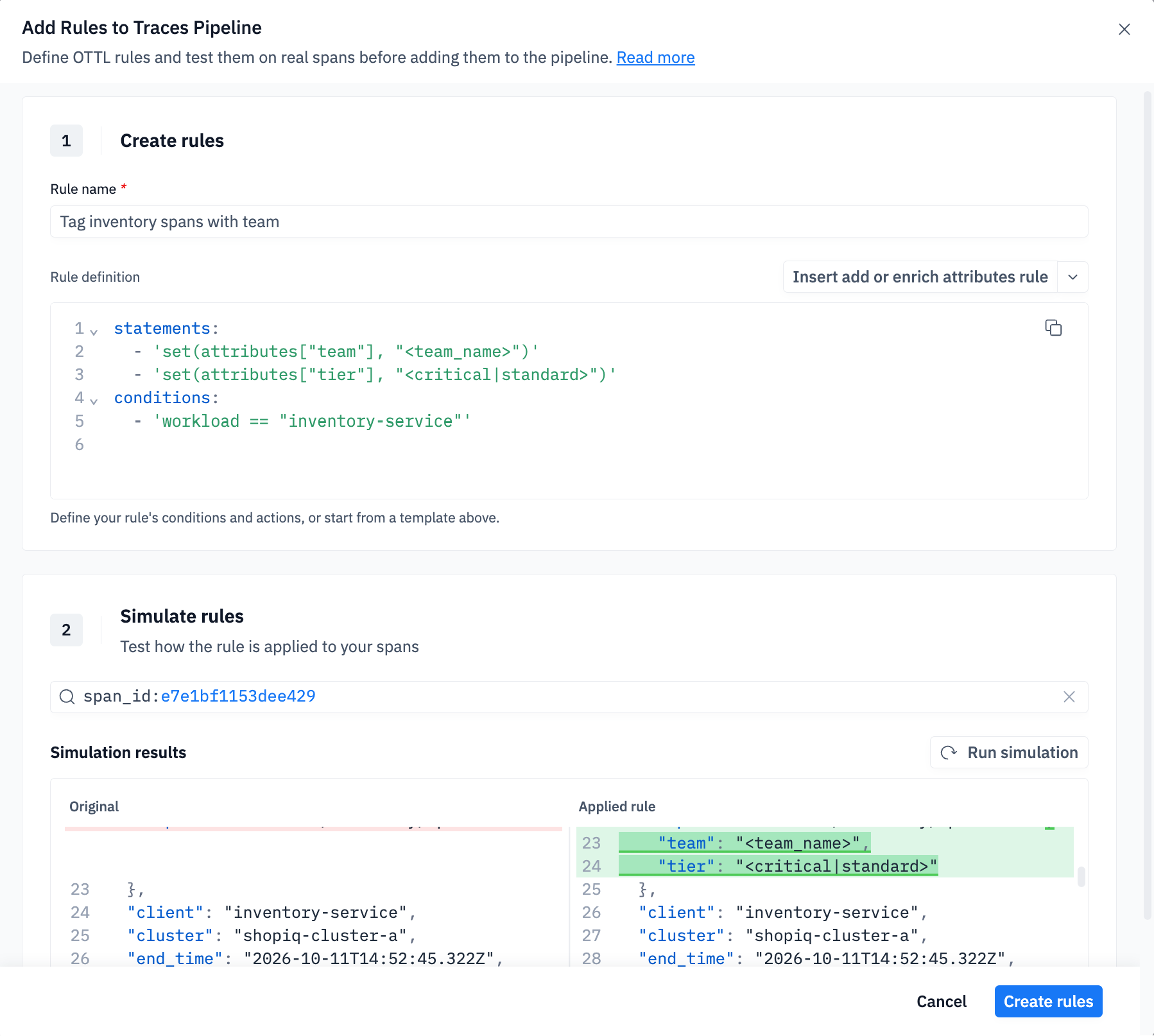
You can create and test traces pipeline rules on real spans in the **Add Rules to Traces Pipeline** modal. You can open it from:

| Where             | How                                         | Sample spans used for testing                                                    |
| ----------------- | ------------------------------------------- | -------------------------------------------------------------------------------- |
| Traces page       | **Actions → Add parsing rule**              | Spans matching the page's current filters                                        |
| Span drawer       | **Add Parsing Rule** in the span header     | The span you opened. The template is pre-filled with a condition on its workload |
| groundcover agent | **Preview OTTL** on a suggested traces rule | One editable rule card for each rule the agent suggested                         |

The modal has two steps.

**1. Create rules.** Give the rule a name and write its body in YAML, or start from a template:

| Template                             | What it does                                                                                                                                  |
| ------------------------------------ | --------------------------------------------------------------------------------------------------------------------------------------------- |
| Add or enrich attributes *(default)* | `set` static attributes such as team or tier                                                                                                  |
| Drop Traces                          | `set(drop, true)`, for example on health check paths. See [Filter Traces](/collect-data/data-pipelines/traces-pipeline/filter-traces.md)      |
| Obfuscate PII                        | `obfuscate_pii` on payloads, URLs and DB statements. See [Obfuscate Traces](/collect-data/data-pipelines/traces-pipeline/obfuscate-traces.md) |
| Remove attributes                    | `delete_key` / `delete_matching_keys`                                                                                                         |
| Rename attributes                    | `set` the new key, then `delete_key` the old one                                                                                              |

**2. Test.** The first sample span is selected when the modal opens. **Run simulation** runs your rule against it and shows one of these results:

* a diff between the original span and the result
* a note that the rule drops the span
* a note that the rule's conditions did not match

<figure><img src="https://2771001740-files.gitbook.io/~/files/v0/b/gitbook-x-prod.appspot.com/o/spaces%2FUHgqKYgCiRKdOpWQdi52%2Fuploads%2Fgit-blob-eedfe95080c3116726795656a9c59a1cfa4b79e7%2Ftraces-add-rules-modal-from-span-simulation-diff.png?alt=media" alt="Add Rules to Traces Pipeline modal opened from a span, with the simulation showing the team and tier attributes the rule adds"><figcaption><p>Opened from a span: the template is conditioned on the span's workload</p></figcaption></figure>

Click **Create rules** to add the rules to the **end** of the traces pipeline.

{% hint style="info" %}

* Only Admins can create pipeline rules.
* **Obfuscate PII** rules can't be simulated, because obfuscation runs in the sensor. The rule card says so. Test these rules in a non-production environment first.
* When the span you opened has no workload, the template uses `conditions: []`, which matches **every** span. Add a condition before you save.
  {% endhint %}

## Writing Pipeline Rules

#### Configuration rule format

The below snippet is the format of a rule

```yaml
ottlRules:
  - ruleName: <rule name>
    ruleDisabled: false
    statements:
      - <list of statements>
    conditions:
      - <list of conditions>
    statementsErrorMode: ignore
    conditionLogicOperator: and
```

* `ruleName` – Meaningful name; shown in the UI and used for rule metrics
* `ruleDisabled` - Temporarily disable a rule without deleting it
* `statements` - One or more [transformations](#common-functions) to apply (required). For example, use `replace_all_matches` to locate a specific value and replace it with another.
* `conditions` - Optional; when the rule should run. Use the [OTTL Comparison Rules](https://github.com/open-telemetry/opentelemetry-collector-contrib/blob/main/pkg/ottl/LANGUAGE.md#comparison-rules) to define the list of conditions.
* `conditionLogicOperator` – `and` / `or` when you have multiple conditions (default: `or`)
* `statementsErrorMode` – How statement failures are handled: `ignore` or `propagate` (default: `propagate`)

**Statement Error Mode**

`statementsErrorMode` controls what happens when a statement in a rule fails (for example `ParseJSON` on a non-JSON body, type mismatches, or missing fields).

<table><thead><tr><th width="191.921875">Value</th><th>Behavior</th></tr></thead><tbody><tr><td><code>ignore</code></td><td>Skip the failed statement, continue with the rest of the statements in that rule</td></tr><tr><td><code>propagate</code></td><td>Stop the remaining statements in that rule and record an error (shows up in rule Error Rate / metadata). Check <code>gc_metadata.OTTL_&#x3C;rule_name>:error</code> to see the affected spans</td></tr></tbody></table>

Failed statements do **not** drop the span. The span continues to later rules and is still ingested unless a rule sets `drop: true`.

**When to use which**

* Enrichment / parsing that may not apply to every span → `ignore`
* You want later statements in the same rule to stop on failure, and errors visible in pipeline metrics → `propagate`

### **Common Functions**

Some commonly used functions in groundcover traces pipelines:

* `set` – Set attribute values
* `delete_key` – Remove specific attributes
* `delete_matching_keys` – Remove all attributes whose keys match a regex
* `merge_maps` – Merge extracted data into attributes
* `replace_pattern` – Replace text patterns (useful for obfuscation)
* `ParseJSON` – Parse JSON strings into structured attributes
* `IsMatch` – Match patterns in span fields
* `Concat` – Concatenate multiple values
* `Substring` – Extract portion of a string
* `obfuscate_pii` – Automatically detect and redact sensitive data
* `obfuscate_matching_keys` – Mask values of map entries whose keys match a regex, keeping the keys in place

For a complete list of available OTTL functions, see the [OTTL Functions Reference](https://github.com/open-telemetry/opentelemetry-collector-contrib/blob/main/pkg/ottl/ottlfuncs/README.md).

**drop** - Span Filtering

The `drop` field is a special boolean flag for filtering spans:

```yaml
statements:
  # Drop unconditionally
  - 'set(drop, true)'

  # Drop conditionally
  - 'set(drop, true) where IsMatch(span_name, "/health")'
```

### **Setting Conditions**

Use `conditions` to apply transformations only when specific criteria match. This ensures your pipeline runs efficiently and only on relevant spans.

Common fields you can use ([full list below](#available-fields-and-keys)):

* `workload` – Name of the service or app
* `namespace` – Kubernetes namespace
* `protocol_type` – Protocol type (e.g. `http`, `grpc`)
* `source` – Data source (`ebpf`, `otel`)
* `span_name` – Name of the span operation
* `kind` – Span kind (`Client`, `Server`, etc.)
* `status` – Span status code
* `cluster` – Kubernetes cluster name
* `env` – Environment name

### Apply rules to specific clusters

The pipeline is shared by all clusters connected to your backend. To run a rule only on spans from some clusters, add a condition on `cluster`:

```yaml
ottlRules:
  - ruleName: tag-payments-in-prod-eu
    conditions:
      - cluster == "prod-eu"
    statements:
      - set(attributes["team"], "payments")
```

To match several clusters, list one condition per cluster and set `conditionLogicOperator: or` (the default), so the rule runs when any of them matches:

```yaml
    conditions:
      - cluster == "prod-eu"
      - cluster == "prod-us"
    conditionLogicOperator: or
```

To combine a cluster condition with another one, set `conditionLogicOperator: and`:

```yaml
    conditions:
      - cluster == "prod-eu"
      - workload == "checkout"
    conditionLogicOperator: and
```

### Available Fields and Keys

When writing pipeline rules, you have access to various fields that represent different aspects of the span. Understanding which fields are writable and which are read-only is crucial for effective rule creation.

**Writable Fields**

These fields can be modified in your pipeline rules:

| Field              | Type    | Description                                                                    |
| ------------------ | ------- | ------------------------------------------------------------------------------ |
| `cache`            | Map     | Temporary storage for intermediate values. Access sub-keys with `cache["key"]` |
| `attributes`       | Map     | Custom span attributes. Access sub-keys with `attributes["key"]`               |
| `drop`             | Boolean | Set to `true` to drop/filter the span                                          |
| `span_name`        | String  | The operation name of the span                                                 |
| `trace_id`         | String  | Trace identifier (32 hex characters)                                           |
| `span_id`          | String  | Span identifier (16 hex characters)                                            |
| `parent_id`        | String  | Parent span identifier (16 hex characters)                                     |
| `start_time`       | Time    | Start timestamp of the span                                                    |
| `end_time`         | Time    | End timestamp of the span                                                      |
| `request_body`     | String  | HTTP request payload content                                                   |
| `response_body`    | String  | HTTP response payload content                                                  |
| `request_headers`  | Map     | HTTP request headers. Access sub-keys with `request_headers["header-name"]`    |
| `response_headers` | Map     | HTTP response headers. Access sub-keys with `response_headers["header-name"]`  |
| `is_pii`           | Boolean | Mark span as containing PII. Automatically set by `obfuscate_pii`              |

**Read-Only Fields**

These fields provide context but **cannot be modified**. Attempting to set them will result in an error:

| Field           | Type     | Description                                               |
| --------------- | -------- | --------------------------------------------------------- |
| `workload`      | String   | Name of the Kubernetes workload                           |
| `source`        | String   | Source of the trace data                                  |
| `cluster`       | String   | Kubernetes cluster name                                   |
| `env`           | String   | Environment name                                          |
| `namespace`     | String   | Kubernetes namespace                                      |
| `protocol_type` | String   | Protocol type (e.g. `http`, `grpc`, `redis`)              |
| `kind`          | String   | Span kind (`Client`, `Server`, `Internal`, etc.)          |
| `status`        | String   | Span status code (`Ok`, `Error`, `Unset`)                 |
| `duration`      | Duration | Span duration (computed from `start_time` and `end_time`) |
| `tags`          | Map      | Span tags (read-only). Access sub-keys with `tags["key"]` |

**Special Fields**

**cache** - Temporary Storage

The `cache` field is useful for multi-step transformations:

```yaml
statements:
  # Extract to cache first
  - 'merge_maps(cache, ParseJSON(response_body), "insert") where response_body != nil'
  # Process cached values
  - 'set(attributes["user_id"], cache["id"]) where cache["id"] != nil'
```

**attributes** - Custom Span Attributes

The `attributes` map is where you store extracted or enriched structured data:

```yaml
statements:
  - 'set(attributes["team"], "payments")'
  - 'set(attributes["priority"], "high")'
```

**request\_body / response\_body** - Payload Access

Access HTTP payloads for obfuscation or inspection:

```yaml
statements:
  - 'replace_pattern(request_body, "password=([^&]+)", "password=[REDACTED]")'
  - 'set(response_body, "<REDACTED>") where is_pii == true'
```

**request\_headers / response\_headers** - HTTP Headers

Access and modify HTTP headers:

```yaml
statements:
  - 'set(response_headers["set-cookie"], "[REDACTED]")'
  - 'set(attributes["user_agent"], request_headers["user-agent"])'
```

### **Troubleshooting Rule Issues**

**High error rates:**

* Open the Traces page, select **Actions → Add parsing rule**, and **Run simulation** with the rule against a matching span
* Review the rule syntax for typos
* Check that field names exist on your spans
* Verify regex patterns are valid
* Prefer `statementsErrorMode: ignore` for rules that parse optional fields (e.g. bodies/headers); high Error Rate with `propagate` often means expected misses, not a broken rule

**High processing latency:**

* Simplify complex regex patterns
* Split multi step rules into separate rules
* Place drop rules earlier to reduce processing volume

**Low condition met percentage:**

* Verify your conditions match actual span attributes
* Check if upstream rules are dropping spans unexpectedly
* Review filter conditions for typos

**Unexpected drop rates:**

* Review the rule logic and conditions
* Check if drop statements have unintended `where` clauses
* Verify the rule order isn't causing issues


---

# Agent Instructions
This documentation is published with GitBook. GitBook is the documentation platform designed so that both humans and AI agents can read, navigate, and reason over technical content effectively. Learn more at gitbook.com.

## Querying This Documentation
If you need additional information that is not directly available in this page, you can query the documentation by asking a question.

Perform an HTTP GET request on the following URL with the `ask` and `goal` query parameters:

```
GET https://docs.groundcover.com/collect-data/data-pipelines/traces-pipeline.md?ask=<question>&goal=<user_goal>
```

`ask` is the immediate question: it should be specific, self-contained, and written in natural language.
`goal` is what the user is ultimately trying to achieve, the reason they need the answer. Sharing it helps GitBook give you a better, more relevant answer. A goal is most helpful when it describes the outcome the user wants rather than restating the question. For example, with `ask=how do I create an API token`, a goal like `automate deployments from our CI pipeline` lets GitBook tailor the answer to that use case.

The response will contain a direct answer to the question and relevant excerpts and sources from the documentation.

Use this mechanism when the answer is not explicitly present in the current page, you need clarification or additional context, or you want to retrieve related documentation sections.
